Questions About a Bill
Through DLO's partnership with Quest Diagnostics, we are able to handle billing questions/concerns through their Customer Service portal. Please have your bill ready to enter information and visit Quest Billing where you can inquire about charges, request an update to insurance, and/or dispute charges.
Ways to Pay Your Bill
- Online (This link will take you to a Quest Diagnostics online payment portal where you can pay both DLO and Quest Diagnostics lab invoices)
- By mail
- To pay your bill by mail, send you payment to the "Send Payments To" address listed on your bill.
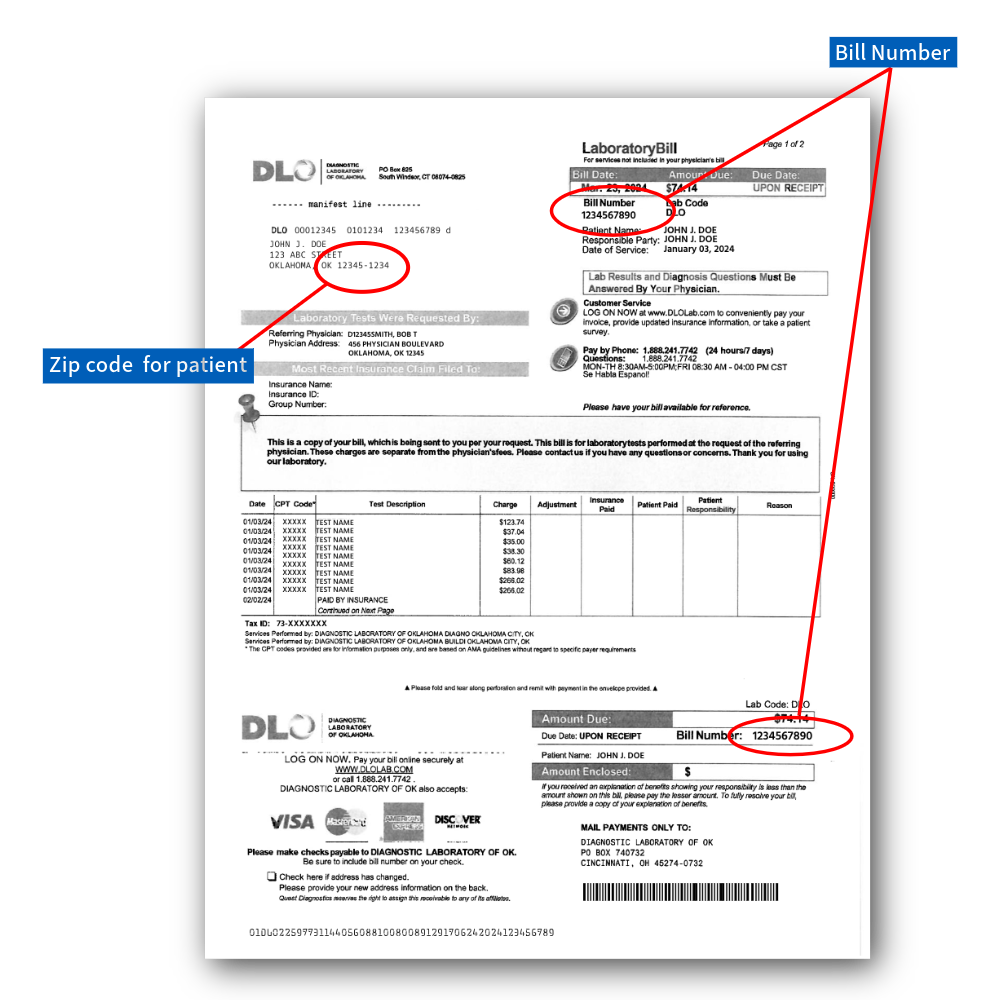
- Please send the Payment Coupon(s) attached to your bill(s) along with your payment. Write your bill number(s) on your check or money order to ensure proper credit is applied.
- By phone at 1.888.241.7742 (option 1 for English/2 for Spanish, then option 5)
Updating Insurance
- To update your insurance, click here. *Note: You will need the bill number, patient's date of birth, and the patient's zip code.
By clicking the links to pay your bill or update your insurance, you will be redirected to the Quest Billing website. This website uses cookies for improvement of quality and user experience. By continuing to this site, you confirm your awareness and acceptance of our use of cookies. For more information or to opt out of the use of cookies, see Quest's Cookies Notice.
Billing Questions
Do you have a question regarding a DLO bill or invoice? Call 1-888-241-7742 (option 1 for English/2 for Spanish, then option 5) and speak to a billing specialist today or for additional help or support with your bill, contact Customer Service by clicking here.
Frequently Asked Billing Questions